Best AI Gadgets for Students in 2026: Smart Tools for Studying and ProductivityStudying
Studying today involves much more than reading textbooks and writing notes. Students often need to organize digital materials, understand complex topics, attend online lectures, learn foreign languages and prepare for exams while managing limited time.
Artificial intelligence is changing how students approach these tasks. New AI-powered devices can summarize handwritten notes, help organize study materials, translate spoken conversations and provide computing features designed to support everyday productivity.
However, not every device advertised as an AI gadget offers meaningful benefits for education. Some products solve specific problems, while others add features that students may rarely use.
In this guide, we explore the best types of AI gadgets for students in 2026, explain what each one can do and help you decide which devices are worth considering for your study routine.
What Are AI Gadgets for Students?
AI gadgets for students are physical devices that use artificial intelligence to support learning, research, communication or productivity.
They include AI-enabled laptops, digital note-taking tablets, smart audio recorders, translation earbuds and other devices designed to make studying more convenient.
Depending on the product, AI features may help users organize information, convert speech into text, summarize notes, translate languages or perform certain tasks directly on the device.
The most useful option depends on how you study. A student attending lectures in another language has different needs from someone reading academic papers, preparing presentations or taking handwritten notes.
1. AI Laptops for Studying and Research

Best for: University students, researchers and students who need an all-purpose computer.
A laptop remains one of the most practical devices for students. AI-enabled laptops add hardware and software features that can support writing, research, video meetings, document organization and other everyday tasks.
Some newer computers include a neural processing unit, or NPU, designed to accelerate certain AI workloads. Depending on the hardware and software, these systems can support features such as real-time effects during video calls, local AI processing and AI-assisted productivity.
Why students may benefit?
An AI-capable laptop can help students manage several parts of their academic workflow in one place. They can research topics, work with PDFs, prepare presentations, join online classes and use compatible AI applications without switching between multiple devices.
Some AI functions can run locally, depending on the computer and application. This may be useful when working without a reliable internet connection or when a task does not require a cloud-based service.
What to look for
Students should prioritize sufficient memory, reliable battery life, a comfortable keyboard, a clear display and enough storage. An NPU can be useful, but it should not be the only reason to purchase a laptop.
Before buying, check which AI features are actually supported by the operating system and whether they require a particular processor, subscription or internet connection.
An expensive AI laptop is not automatically better for studying than a well-equipped conventional laptop.
2. AI Note-Taking Devices

Best for: Students who attend lectures, conduct interviews or need to organize spoken information.
Taking notes during a lecture can be difficult. Students must listen, understand the material and record important points at the same time.
AI note-taking devices aim to reduce this workload by capturing audio and using speech recognition to create transcripts. Depending on the product, the accompanying software may also generate summaries, identify important topics and organize information for later review.
One example is the Plaud NotePin S, a wearable AI recording device designed to capture spoken information and support AI-assisted transcription and summaries.
Why students may benefit
A suitable note-taking device can help students revisit complicated explanations after class. Instead of relying entirely on handwritten notes, they may be able to search a transcript, review a summary or locate a particular part of a lecture.
These features can be especially useful for interviews, research discussions and language-learning exercises.
What to look for
Check recording quality, transcription support for your language, battery life, storage, export options and the cost of any transcription or AI subscription.
Also check whether the device requires an internet connection to process recordings and where the resulting audio and transcripts are stored.
Important consideration: Students should follow their institution’s recording policies and obtain permission when required before recording lecturers, classmates or private conversations. AI-generated transcripts and summaries can contain errors, so important information should be checked against the original material.
3. Digital Note-Taking Tablets With AI Features
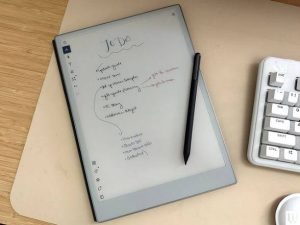
Best for: Students who prefer handwritten notes and digital textbooks.
Some digital writing devices combine an electronic reading experience with a notebook. They allow users to annotate documents, organize handwritten notes and keep study materials in one place.
The Amazon Kindle Scribe is one example of this category. Its supported AI notebook features include summarization, natural-language search and handwriting refinement. Availability varies by model, region and software configuration.
Why students may benefit
A digital notebook can make it easier to keep lecture notes, reading annotations and study plans organized. Students can also use compatible devices to annotate supported documents rather than carrying several paper notebooks.
AI-powered summaries and search can help users revisit previously recorded ideas without manually reading every page.
What to look for
Consider screen size, writing comfort, document compatibility, handwriting recognition, file export and the ability to organize notes into folders or notebooks.
Students who need to read scientific papers with diagrams, color-coded charts or complex layouts should also check how well a device handles those documents before purchasing it.
A digital notebook is most useful when its reading and writing experience fits the student’s existing workflow.
4. AI Translation Earbuds for Language Learning
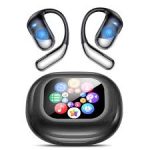
Best for: Students studying foreign languages or attending multilingual lectures and events.
Language barriers can make studying abroad, participating in international programs and communicating with other students more challenging.
AI translation earbuds are designed to translate spoken language between supported languages. Some models also offer translation for phone calls, online meetings and multimedia content.
The Timekettle W4 Pro is one example. Its manufacturer advertises real-time interpretation features, support for multiple languages and translation options for selected audio and video content.
Why students may benefit
Translation earbuds may help students understand unfamiliar spoken language, follow certain multilingual discussions and practice communication in another language.
They can also be useful for students living abroad who need occasional assistance understanding everyday conversations.
What to look for
Check supported language pairs, offline translation availability, microphone quality, battery life, smartphone compatibility and whether the translation functions you need require a subscription.
Do not assume every language is supported in every mode. A device may offer a language for online translation but not for offline use or a particular conversation feature.
Translation technology can also misinterpret technical vocabulary, accents and fast speech. Students should use it as a learning aid rather than treating every translated sentence as authoritative.
5. AI E-Readers for Academic Reading

Best for: Students who read large amounts of digital material.
Reading is a major part of academic life. Students may need to review textbooks, course readings, research articles and long documents throughout the semester.
An e-reader can provide a portable way to read compatible digital books, while selected devices offer note-taking or AI-assisted organization features.
Some reading devices allow students to annotate text, highlight passages and organize notes alongside their reading materials. Other AI functions may help summarize or search notes, depending on the product.
Why students may benefit
A dedicated reading device can help students keep a large collection of books and documents in one place. A screen designed primarily for reading may also be preferable for people who want a simpler alternative to using a general-purpose tablet for every task.
However, not every e-reader has AI features, and basic e-readers should not be described as AI gadgets simply because they are digital.
What to look for
Check supported file formats, PDF handling, annotation tools, screen size, lighting, storage and integration with your existing reading services.
For academic work involving detailed charts, large PDFs or color diagrams, a larger tablet may be more practical than a compact e-reader.
6. AI Voice Recorders for Lectures and Revision
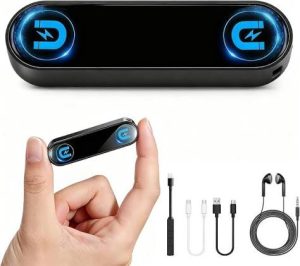
Best for: Students who need to revisit explanations and organize spoken information.
AI voice recorders are designed to capture speech and turn recordings into more searchable study material.
Depending on the product, the software may generate transcripts, summaries, topic sections or action points. These features can make long recordings easier to review.
Some devices focus on recording meetings and lectures, while others are designed to be worn throughout the day. Their capabilities and recording limits can differ considerably.
Why students may benefit
A voice recorder can be helpful when a lecture contains complicated explanations or when students want to review material after class.
Transcripts can also make it easier to locate a particular term or discussion without listening to an entire recording again.
What to look for
Compare recording quality, supported languages, transcription accuracy, maximum recording duration, export formats, storage limits and recurring software costs.
Before choosing a dedicated recorder, consider whether your smartphone or laptop already offers suitable recording and transcription features.
A separate device is worth considering only if it provides a clear advantage for your particular study needs.
7. AI Study Assistants Used With Your Devices

Best for: Students who want help understanding material, reviewing notes and preparing for exams.
Not every useful AI study experience requires a new physical gadget. Software can make an existing laptop, tablet or smartphone more effective for studying.
For example, Google NotebookLM can work with materials supplied by a user and help generate summaries, study guides and other learning resources. Its source-based approach can help students return to the documents they are studying rather than relying entirely on general answers.
AI study assistants can help with tasks such as:
Explaining a difficult concept in simpler language.
Creating practice questions from lecture notes.
Summarizing long readings for initial review.
Organizing topics into a study plan.
Generating flashcards for revision.
Identifying areas that need further explanation.
Students should still verify important facts against their course materials. AI-generated explanations, summaries and questions can contain mistakes or leave out important details.
These tools work best when they support active learning rather than replacing reading, independent reasoning or the student’s own academic work.
How to Choose the Best AI Gadgets for students
The best AI gadget is not necessarily the newest or most expensive device. It is the one that addresses a real problem in your study routine.
Use the following guide to narrow down your options.
If you need one device for most academic tasks, start with a reliable laptop.
If you frequently take handwritten notes, consider a digital note-taking tablet.
If you struggle to keep up with spoken explanations, explore AI note-taking devices or voice recorders.
If you study a foreign language or regularly communicate across languages, translation earbuds may be useful.
If you read large amounts of digital material, consider an e-reader or a tablet with suitable annotation tools.
If your main goal is exam preparation, begin by exploring AI study software that works with your existing device before spending money on new hardware.
AI Gadgets for Students: What Should You Check Before Buying?
Before purchasing an AI-powered device, evaluate the following factors.
Price and ongoing costs
Consider the total cost of ownership, including subscriptions, cloud processing, storage and accessories. A device with a low purchase price may become expensive if its most useful AI features require a monthly plan.
Compatibility
Check whether the device works with your operating system, preferred applications, document formats and languages.
Battery life and portability
Students often move between classrooms, libraries, dormitories and home. A portable device with dependable battery life may be more practical than a more powerful but cumbersome alternative.
Privacy and data handling
AI devices may process personal notes, recordings, documents or account information. Review the manufacturer’s privacy policy and understand whether data is processed locally or sent to external services.
Accuracy and reliability
AI can misinterpret speech, generate incorrect summaries or misunderstand instructions. Always review important academic material rather than relying on automated output without verification.
Academic integrity
Follow your institution’s rules on AI assistance, recording and the use of generated material. AI should support learning and help students understand subjects, not be used to misrepresent someone else’s work as their own.
Are AI Gadgets Worth It for Students in 2026?
AI gadgets can be valuable when they solve a specific problem.
An AI laptop can support research and everyday academic work. A digital notebook can make handwritten notes easier to organize. A voice recorder can help students revisit lectures, while translation earbuds may reduce language barriers.
However, buying several AI devices does not automatically lead to better academic results. Some students may benefit more from one dependable laptop and a well-chosen study application than from multiple specialized gadgets.
The most effective approach is to identify the part of studying that takes the most time, find a device that addresses that need and test whether it genuinely improves your workflow.
Final Verdict: Which AI Gadgets Should Students Choose?
The best AI gadgets for students depend on their study habits, budget and academic requirements.
For most students, a dependable laptop is the most versatile starting point. Students who take extensive notes may benefit from a digital notebook or AI note-taking device. Language learners can consider translation earbuds, while students who read many digital books may prefer a dedicated e-reader or writing tablet.
Before buying, compare real-world usefulness, supported features, privacy controls and ongoing costs. AI should make studying more organized and efficient without replacing the student’s own effort and judgment.
As AI hardware continues to evolve, students should focus on practical benefits rather than marketing claims. The right device is the one that helps you learn more effectively.
Frequently Asked Questions
What are the best AI gadgets for students in 2026?
Useful options include AI-capable laptops, digital note-taking tablets, AI voice recorders, translation earbuds and compatible e-readers with smart organization features. The best choice depends on the student’s needs and budget.
Are AI gadgets useful for university students?
Yes, they can help with research, note organization, transcription, language learning and revision. Their value depends on how reliably they perform the tasks a student needs.
What is the best AI gadget for taking lecture notes?
An AI note-taking device or compatible digital notebook may help. Students should compare transcription quality, language support, recording limits, privacy controls and subscription costs.
Do students need an AI laptop?
Not necessarily. A conventional laptop may be sufficient for many academic tasks. AI-specific hardware is worth considering when its supported features provide a practical benefit.
Can AI gadgets replace traditional studying?
No. They can support learning and organization, but students still need to understand the material, verify information and practice independently.
Are AI translation earbuds useful for international students?
They can help with some multilingual conversations and supported audio content. However, translation accuracy, supported languages and offline capabilities vary by device.
What should students consider before buying an AI study device?
Important factors include price, recurring costs, battery life, portability, compatibility, privacy, language support and accuracy.